
Session recording privacy policy template
Pick the tool that records your site and copy a plain-language section for your privacy policy: what's recorded, what's masked, cookies, how long recordings are kept and who to contact. Presets cover Session Recordings, Microsoft Clarity, Hotjar and Wix Analytics' Session Recordings.
Your notice
Session recording
We use Session Recordings by myuser.ai to record how visitors use our website: the pages you open, where you click or tap, how far you scroll and the items you add to your cart. We use these recordings to find and fix problems and to make the site easier to use.
Anything you type into forms on our site is masked in your browser before it is sent, so we can't see it in a recording. The words you submit in our site search may be recorded, so we can see what visitors look for.
We only record your visit if your cookie choices allow analytics. You can change your choice at any time in our cookie settings.
Recordings are deleted automatically after 30 days, except recordings we keep to look into a specific problem. Session Recordings by myuser.ai processes recordings on our behalf.
To ask about recordings of your visits, or to ask us to delete them, contact [your contact email].
We use Microsoft Clarity, together with Microsoft Advertising, to see how you use our website through behavioral metrics, heatmaps and session replays. We use what we learn to improve and market our products and services.
Clarity collects this information with first- and third-party cookies and similar technologies. We use it to see which products, services and pages are popular, to optimize our site, to prevent fraud and keep the site secure, and for advertising.
Microsoft collects or receives personal data from us to provide Microsoft Advertising, and it decides for itself how to use that data, including to improve its products and for advertising. The Microsoft Privacy Statement explains how Microsoft collects and uses your data.
Clarity masks what you type into form fields, so it isn't sent to Microsoft. The words you submit in our site search may be recorded, so we can see what visitors look for.
Clarity follows the choices you make in our cookie banner. If you don't allow its cookies, it still collects some information, such as page views and basic interactions, but it can't link the pages of your visit together or replay your visit in full. You can change your choice at any time in our cookie settings.
Clarity keeps recordings for 30 days. Recordings we mark as favorites, and a random sample of others, are kept for up to 9 months.
To ask about recordings of your visits, or to ask us to delete them, contact [your contact email].
We use Hotjar, part of Contentsquare, to understand how visitors use our website and to improve it. Hotjar shows us how you interact with our pages, so we can find problems and points of friction.
Hotjar uses first-party cookies and similar technologies to collect information about your behavior and your device on our behalf: online identifiers such as your device's IP address and a user ID, your device type, screen size and browser, your country, and what you do on our pages, such as clicks, taps and scrolls.
Hotjar hides what you type into forms. The words you submit in our site search may be recorded, so we can see what visitors look for.
We load Hotjar only if your cookie choices allow analytics. You can change your choice at any time in our cookie settings.
Hotjar keeps recordings for 365 days and may reuse this information to develop and improve its tools and services. Hotjar's privacy policy has more detail.
To ask about recordings of your visits, or to ask us to delete them, contact [your contact email].
Our website runs on Wix, and we use the session recordings in Wix Analytics, powered by Twipla, to see how visitors use our site, such as where you click and how you scroll. We use these recordings to find and fix problems and to make the site easier to use.
Text on our pages is hidden in these recordings, including anything you type. The words you submit in our site search may be recorded, so we can see what visitors look for.
Wix Analytics collects data only from visitors who accept cookies in our cookie banner. You can change your choice at any time in our cookie settings.
Wix keeps these recordings for up to 36 months.
To ask about recordings of your visits, or to ask us to delete them, contact [your contact email].
We use these tools to see how visitors use our website, so we can find and fix problems and make the site easier to use: Session Recordings by myuser.ai and Microsoft Clarity.
Session Recordings by myuser.ai records the pages you open, where you click or tap, how far you scroll and the items you add to your cart. Anything you type into forms is masked in your browser before it is sent. It records your visit only if your cookie choices allow analytics, processes recordings on our behalf and deletes them after 30 days, except recordings we keep to look into a specific problem.
Microsoft Clarity, which we use together with Microsoft Advertising, captures behavioral metrics, heatmaps and session replays with first- and third-party cookies and similar technologies. We use what it collects to improve and market our products and services, to optimize our site, to prevent fraud and keep the site secure, and for advertising. Microsoft collects or receives personal data from us to provide Microsoft Advertising and decides for itself how to use it, as the Microsoft Privacy Statement explains. Clarity masks what you type into form fields. If you don't allow its cookies, it still collects some information, such as page views and basic interactions, but can't replay your visit in full. It keeps recordings for 30 days, and favorites and a random sample for up to 9 months.
Hotjar, part of Contentsquare, uses first-party cookies to collect information on our behalf: your device's IP address and a user ID, your device type, screen size and browser, your country, and your clicks, taps and scrolls. It hides what you type into forms, may reuse this information to develop and improve its tools, and keeps recordings for 365 days. We load it only if your cookie choices allow analytics. Hotjar's privacy policy has more detail.
Wix Analytics' session recordings, powered by Twipla, show where you click and how you scroll on our site. Text on our pages, including anything you type, is hidden in them. Wix Analytics collects data only from visitors who accept cookies in our cookie banner, and Wix keeps these recordings for up to 36 months.
The words you submit in our site search may appear in these recordings, so we can see what visitors look for.
You can change your cookie choices at any time in our cookie settings.
To ask about recordings of your visits, or to ask us to delete them, contact [your contact email].
General information, not legal advice. The wording assumes your store or site asks for cookie consent. On Shopify, turn on the cookie banner under Settings › Customer privacy; on Wix, without a banner, Wix loads every cookie and script as soon as a visitor arrives, so turn the banner on (steps below) or rewrite the consent lines. Keep the notice true to how you actually record.
Your details
What the notice covers, and why
- What's recorded and why. Visitors should know that pages, clicks, taps, scrolling and cart activity are recorded, and that you use recordings to fix problems.
- What isn't. Say what typing is masked, such as what visitors type into forms. If search words can appear in a recording, for example on your search results page, say so.
- Consent. Explain that recording follows the visitor's cookie choices, and how to change them.
- Retention. Give the period after which recordings are deleted, and mention that you may keep a specific recording to look into a problem.
- Who handles the data. Name the tool and the company behind it. Session Recordings and Hotjar process recordings for you, while Microsoft's terms make you and Microsoft independent controllers of Clarity data1, so the Clarity notice says more about what Microsoft does with it.
- Contact. Tell visitors who to ask about, or delete, their recordings.
For more detail on masking, consent and notices, read our guide to session recording privacy, and see how Session Recordings keeps recordings private. How long you keep recordings is a choice too: how long to keep session recordings walks through it.
Microsoft Clarity privacy policy wording
Clarity's terms require your privacy notice to say that third parties such as Microsoft may collect personal data from your visitors, to say that Microsoft collects or receives personal data from you to provide Microsoft Advertising, to link to the Microsoft Privacy Statement, and to offer opt-out choices where the law requires them1. The Clarity preset above covers each point.
- Who decides how the data is used: the terms make you and Microsoft independent controllers, not a site and its processor, and let Microsoft use the data to improve its products and to build profiles for advertising1.
- Microsoft's own sample: a short notice for your footer or home page and a longer paragraph for your privacy policy, both meant to be adapted to how you use Clarity2.
- Consent on Wix: once the Wix cookie banner is on, Clarity reads each visitor's choice by itself3. For visitors in the EU, the terms say you must get consent for cookies, keep records of it and give a clear way to withdraw it1; the banner's consent log, under Privacy & Cookies, then Visitor Data, keeps those records4.
- Without consent: Clarity still collects page views and basic interactions, but splits each visit into separate sessions and can't replay it in full5.
- What's masked: whatever visitors type into form fields, in every masking mode, and in the default Balanced mode also numbers and email addresses shown on the page6.
- How long Clarity keeps recordings: 30 days, with favorites and a random sample kept for up to 9 months5.
- Deleting one visitor's data: Clarity's FAQ says you have to delete the whole project5.
Open the Clarity notice in the generator, or see how Microsoft Clarity and Session Recordings compare on a Wix site.
Hotjar privacy policy wording
Hotjar's sample wording says why you use it, that it uses first-party cookies to collect data on your behalf, which kinds of data it collects, and that it may reuse that data to develop and improve its tools7. Hotjar acts as your processor, so collecting consent and handling visitors' requests to see their data is your job8.
- What it collects: online identifiers such as the device's IP address and a user ID, the device type, screen size and browser, the country, and clicks, taps and scrolls, plus a name or email address only if you collect them through Hotjar7.
- Typing: Hotjar suppresses keyboard input by default8, and Contentsquare blocks it altogether9.
- Moving to Contentsquare: Hotjar's help center says Hotjar accounts are moving onto Contentsquare, after which Hotjar collects no new data9. Once yours has moved, name Contentsquare in your notice and pick Something else to give its retention period.
- How long Hotjar keeps recordings: 365 days from capture10.
- On Wix: Hotjar needs a connected domain, goes in as custom code and can't collect data from Wix Stores, Wix Forum, Wix Pro Gallery or Wix Events11. Wix loads custom code before consent unless you set its type to Analytics, as step 3 below shows12.
Open the Hotjar notice in the generator, or see Hotjar, now Contentsquare, and Session Recordings compared on a Wix site.
Wix Analytics' Session Recordings wording
Wix's own session recordings, in Wix Analytics, need an upgraded site and keep recorded sessions for up to 36 months13, and they're powered by Twipla14. With a cookie banner on, Wix Analytics collects data only from visitors who accept cookies15, which the notice for this preset says in plain words.
- Privacy modes: Wix offers Light, Medium, GDPR and Maximum privacy. Medium hides visitors' IP addresses, and GDPR and Maximum add more anonymity13.
- Hidden text: the recording settings include Obscure All Text13. Twipla says it hides all text in recordings made after you switch it on, including what visitors type, except placeholder text16. Tick it in the form if you use it.
- Missing visits: Wix says some visitors aren't recorded because they use private browsers or refuse cookies13.
Open the Wix Analytics notice in the generator, or see how Wix Analytics' Session Recordings, TWIPLA and Session Recordings compare.
Add the notice to your Wix site
- Paste it into your privacy policy. Press Copy as text and paste it into your privacy policy page. No page yet? In the Wix Editor, click Pages & Menu, then + Add Page and + Blank Page, name it Privacy Policy, add a text box for the policy and link the page from your footer17.
- Turn on the cookie banner. In your dashboard, open Privacy & Cookies, click Add to Site next to the cookie consent banner, then Agree & Add, run the scan and switch on Show banner. Visitors can accept everything or switch off types such as Analytics, and until they choose, only essential cookies and scripts load18.
- File tracking code under Analytics. Code you add in Settings, then Custom Code, counts as essential and loads before consent unless you open its Code Type tab and choose Analytics12. Wix also says its banner can't guarantee it blocks cookies from third-party App Market apps18, so check each app's own consent handling: Microsoft says Clarity reads the Wix banner by itself3, and Session Recordings loads its recorder only after a visitor allows analytics.
- Test it in a private window. Open your published site, decline analytics cookies and click around: with Session Recordings, no new visit should appear on the Replays page. Then accept, click again and watch your visit arrive. Running a test visit you control goes step by step.
Add the notice to your Shopify store
- Paste it into your privacy policy. Press Copy as text. In your Shopify admin, go to Settings, then Policies, and click your privacy policy under Written policies. If Use automated policy is on, Shopify's steps have you turn it off first. Paste the notice and click Save. Shopify links your policies in your checkout's footer; to link the page before checkout too, add it to a menu under Content, then Menus19.
- Turn on the cookie banner. Go to Settings, then Customer privacy, and click Cookie banner. Shopify asks for a published privacy policy first. In the regions the banner covers, Shopify collects non-essential data only after a visitor consents20.
- Check what the banner reaches. Session Recordings reads each visitor's choice through Shopify's Customer Privacy, so where your banner asks, it records only visitors who allow analytics. Shopify says cookies or pixels added by hand may need a banner of their own or custom logic to follow consent20.
- Test it in a private window. Open your live store, not the theme editor, decline analytics and click around: with Session Recordings, no new visit should appear on the Replays page. Then allow analytics, click again and watch your visit arrive.
Recordings that are private by default
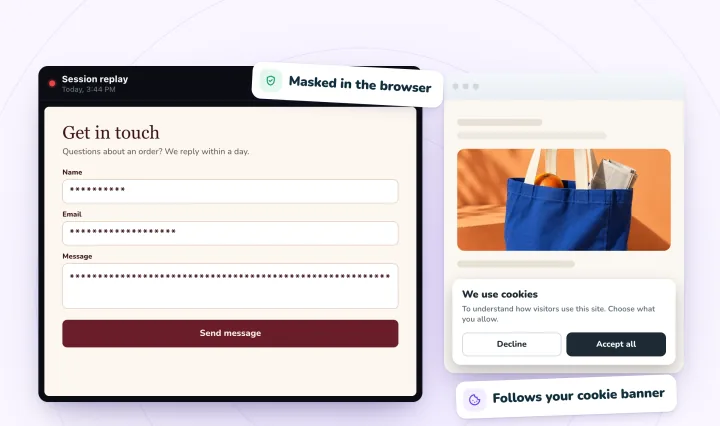
What visitors type into form fields is masked in their browser before it's sent, recording follows your cookie consent, and replays you don't star are deleted after 30 days. Free forever: 2,000 recordings a month.
Sources
Checked on , and the Shopify Help Center pages on . Terms and help pages change, so read each company's current version before you publish your notice.
- Microsoft Clarity Terms of Use, section 4.4 (data processing obligations)
- Microsoft Clarity: Sample wording for Clarity site and privacy policy disclosure
- Microsoft Clarity: Cookie consent for third-party platforms (Wix)
- Wix Help: Managing your site's consent log
- Microsoft Clarity: Frequently asked questions
- Microsoft Clarity: Masking content
- Hotjar Documentation: Sample wording for your privacy policy
- Hotjar Documentation: Processing personal data in Hotjar
- Hotjar Documentation: Moving from Hotjar to Contentsquare, FAQs
- Hotjar Documentation: Privacy FAQs
- Hotjar Documentation: Wix
- Wix Help: Categorizing your custom code
- Wix Analytics: Adding and setting up Session Recordings
- TWIPLA: Wix Analytics enhanced by TWIPLA-powered session recordings
- Wix Analytics: FAQs
- TWIPLA: Website settings (Obscure all text)
- Wix Help: Adding your privacy policy or terms and conditions to your site's footer
- Wix Help: Displaying a Usercentrics for Wix cookie banner
- Shopify Help Center: Adding store policies
- Shopify Help Center: Configuring customer privacy settings
Session recording and privacy, answered
Do I need to mention session recording in my privacy policy?
In many places, yes. Privacy laws generally expect you to tell visitors what you collect, why and who processes it, and a session recording tool collects how people use your site. A short, plain section like the one above covers the basics. This is general information, not legal advice.
Do I need consent to record website visitors?
It depends on where you and your visitors are. Many sites only record visitors whose cookie choices allow analytics, which is how Session Recordings works. Check the rules that apply to your site, or ask a lawyer if you're unsure. This is general information, not legal advice.
Should a session recording tool capture what visitors type?
It's safest if it doesn't. Masking typed text in the visitor's browser means passwords, card numbers and messages never reach the recording. Session Recordings masks what visitors type into form fields in the visitor's browser, so a replay shows that someone typed, never what they typed. On a Shopify store, the words a shopper submits in its search can show in the replay.
Can visitors ask me to delete their recordings?
Yes, and you should make that easy: say who to contact in your notice. With Session Recordings, replays are deleted automatically after 30 days unless you star them, and you can delete any one sooner with Delete replay in the player, or ask us to. Microsoft Clarity's FAQ says the only way to delete one visitor's data there is to delete the whole Clarity project.
See your next visit through your visitor's eyes
Install it on Shopify and switch it on in your theme, or add it to your Wix site. Recording starts with your next visitor.