
Conversion funnel calculator: find where shoppers drop off
Enter the sessions at each step of your store's funnel, from Shopify's or Wix's report or your own steps. See each step's rate, the sessions it loses and the biggest drop after the first step: the one to watch replays of first.
How does the funnel calculator work?
Each step's sessions are part of the step before: a shopper who added to cart had viewed a product first. For each step the calculator shows:
- Of the step before. This step's sessions ÷ the previous step's: the share that went on. Wix's Store Analytics shows its funnel this way.
- Of all. This step's sessions ÷ the first step's. Shopify's Conversion rate breakdown shows its funnel this way.
- Lost. The previous step's sessions minus this step's: the visits that stopped there.
- The biggest drop. The step that loses the largest share of the sessions that reached the one before, from the second step on. A tie goes to the step closer to the sale.
- What if. The share you choose of the sessions lost at the biggest drop, carried through the later steps at their own rates, to show what that step is worth at the end.
The first step is left out of the biggest drop because it counts every visit, including people who came for your opening hours, a blog post or your returns policy. Among shoppers who showed interest, the drop you can act on is clearer. In a funnel of two steps, the one drop is the biggest.
Reading Shopify's Conversion rate breakdown
In your Shopify admin, open Analytics › Reports, then Conversion rate breakdown. It follows all sessions through sessions with cart additions, sessions that reached checkout and sessions that completed checkout, and gives each step as a share of all sessions. Which reports you can open depends on your Shopify plan. Pick Shopify Conversion rate breakdown above and type in its four counts.
In the made-up month, 78 of 180 cart sessions reached checkout, so the cart is where to look. Shopify counts a session as reaching checkout once the shopper types or clicks during checkout, so part of a drop at that step can happen on the checkout page itself, which no replay shows. Why shoppers leave carts on Shopify covers what to check.
Reading Wix's Store Analytics funnel
In your site's dashboard, open Store Analytics, under Sales in the Analytics section. Its funnel runs from site sessions through viewed product, added to cart and reached checkout to converted sessions, and gives each rate as a share of the step before, except the last, which is a share of all sessions. Pick Wix Store Analytics above and type in its five counts.
Use the switch at the top of Wix's funnel to compare desktop and mobile, and run the calculator once for each: if one device keeps less than half the other's share at a step, watch that device's visits first. Why visitors leave without buying reads the same made-up month step by step.
Then watch the visits behind the drop
A funnel shows where shoppers stop, not why. Open about ten visits that reached the step before the drop and didn't go on, and note what each shopper tried: a size they couldn't pick, a delivery cost that appeared late, a button that seemed to do nothing. When the same problem keeps coming up, fix it, then check the same step two weeks later. For a rarer problem, how many recordings to watch works out how many you need.
Watch the visits behind your biggest drop
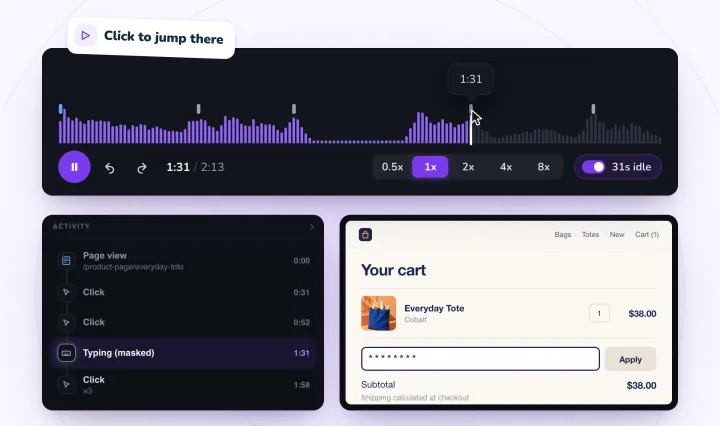
Session Recordings records real visits to your Shopify store or Wix site from their first page, so you can watch what shoppers did at the step where they stop. What visitors type into form fields is masked in their browser before it's sent. Free forever: 2,000 recordings a month.
Conversion funnels, answered
What is a conversion funnel?
The steps a visit takes on the way to an order, such as viewing a product, adding it to the cart, reaching checkout and paying, with the number of sessions that got to each one. The gaps between the steps show where people stop.
How do you calculate the drop-off at a funnel step?
Take the step's sessions away from the step before, then divide by the step before. If 900 sessions viewed a product and 72 added to cart, 828 didn't: 828 ÷ 900 = 92% drop-off at that step.
Why do Shopify and Wix show different rates for the same step?
They divide by different things. Shopify's Conversion rate breakdown gives each step as a share of all sessions, and Wix's Store Analytics gives each step as a share of the step before it, except the last. The calculator shows both, so you can match whichever report you have.
Which funnel step should I fix first?
The one that loses the largest share of the shoppers who reached it, after the first step, which also counts visitors who never meant to buy. When two steps lose about the same share, start with the one closer to the sale, then watch the visits that stopped there to see why.
Can I use my own funnel steps?
Yes. Pick My own steps, rename them and add up to 6. Each step should count the sessions that got at least that far, for the same days, so each one is part of the step before.
See your next visit through your visitor's eyes
Install it on Shopify and switch it on in your theme, or add it to your Wix site. Recording starts with your next visitor.