On this page
- Why is my Wix form not submitting?
- Where do Wix form submissions go?
- Why is my Wix contact form not sending emails?
- Test your form from start to finish
- How do I stop spam form submissions on Wix?
- Is there a limit on Wix form submissions?
- See what happened when visitors pressed Send
- Frequently asked questions
- Try it on your site
- Sources
If a Wix form won't submit, look at the page before the settings: an element covering its fields or Send button, a required field visitors can't see or a limit the form has reached will each stop it. If it submits but no email arrives, look in the form's Spam tab, your junk folder and the recipients of the automation that sends the email.
One test from your live site tells you which of the two you have. If the test never reaches Forms & Submissions in your dashboard, Spam tab included, the form is the problem; if it's there but no email came, the email is. Replays of real visits then show what happened to the people who tried: where they typed, how often they pressed Send and what the form said back.
Key takeaways
- Send a test from your published site while logged out of Wix: if it isn't in Forms & Submissions, Spam tab included, the form is the problem; if it's there but no email came, the email is.
- A form stops visitors when something sits over its fields or Send button, when a required field isn't marked or is hidden on phones, or when it reaches a submission limit or closing date you set.
- Notification emails come from a Wix automation: check your junk folder, the automation's recipients and its run log, and update the recipients yourself after changing your Wix account email.
- A replay of the visit shows where someone typed (as asterisks), how often they pressed Send and what the form showed them, but never what they typed.
Why is my Wix form not submitting?
Because something stops the visitor before the form can send. Wix's help names elements sitting over the form, Velo elements added inside it and required inputs hidden on phones; a form also stops taking submissions at a limit or closing date you set, and a payment form needs a payment method and an upgraded site.
- Something covers the fields or the button. If visitors can't type into your form on the live site, Wix's first check is for elements placed over its fields in the editor. When a button can't be clicked, Wix says it's most likely covered by another element or page section, sometimes a transparent part of one, or by a frozen footer. Right-click the button in the editor, choose Arrange, then Bring to Front, and publish.
- Velo elements added to the form. Wix says not to add Velo by Wix elements to a form: add new fields through the form's own settings instead.
- A required field that isn't marked. With the form's required field style set to None, nothing marks a required field, and a rule can make a field required after an earlier answer. Set the style to Asterisk or Label under Settings in the form builder.
- A page with no way forward. On a form with several pages, Wix's tip is to add a Submit field to each page, so visitors can move on with Next.
- The form has closed. Once a submission limit or closing date you set is reached, Wix replaces the form with a message saying you're no longer accepting submissions.
- Payment fields. A form that takes payments sends visitors to a checkout page after they submit, and it needs a connected payment method and an upgraded site. If either is missing, an orange alert on the form's Payment tab says which.
- A Signature field on a standalone form. Wix has a known-issue article, first published in February 2023 and still marked as under investigation, saying standalone forms with a Signature field aren't being submitted. Its workarounds: remove the field, or use a form on a page of your site instead.
- A custom form built on the CMS. If your form is input elements connected to a dataset rather than a Wix Forms form, Wix's checklist is: the dataset mode set to Write or Read & Write, collection permissions that let visitors add content, no required input hidden on mobile or at a Studio breakpoint, and no validation errors when you submit.
- Only on phones. If the form works on a computer but not on a phone, Wix suggests checking for overlapping elements in the mobile editor, then testing on other devices and browsers. If the form doesn't show on phones at all, why a Wix site doesn't display properly on mobile shows where hidden elements go.
- A Wix outage. Wix's status page lists current incidents, though Wix notes that issues affecting a small number of users may not appear there.
Repeated presses on a Send button that does nothing can mean something is covering it: rage clicks on Wix covers the causes and fixes.
Where do Wix form submissions go?
Into a submissions table for each form, under Forms & Submissions in your site's dashboard, and by default into an email to the site owner. New Wix Forms split that table into Submissions, Spam and Trash tabs. Anything the spam filter catches waits in Spam for 30 days and is then permanently deleted.
- Submissions. Click the More Actions icon next to the form and select View submissions, or click the form in the editor, then Edit Form and the Submissions tab.
- Spam. Submissions the filter catches, and ones you report as spam, stay here for 30 days. To rescue a real one, select it and click Report as not spam.
- Trash. Submissions you move to trash stay for 180 days, and you can restore them.
- Your inbox. By default, Wix emails the site owner when someone submits the form, through an automation you can edit (see below).
- Wix Inbox. Submissions show there as notifications once you add a Show in Inbox action to the form's automation.
- Old Wix Forms. Click the Old Forms tab, then View Submissions Table. There are no Spam or Trash tabs: with the form's spam filter on, suspected spam is hidden from the table. The table shows data as of your last publish, and only from when it was created. If none appears, create one in the editor under Form Settings with Create Submissions Table, then publish.
A site can have forms of both versions at once, and Wix's guide to the difference between them shows how to tell which one you're using.
Why is my Wix contact form not sending emails?
Because something on the way from the form to your inbox stops it: a spam filter, the wrong recipient in the automation, or an automation that didn't run. Wix's troubleshooting starts with your junk folder, its sender addresses and the automation's recipients, which don't change when you change your Wix account email.
- Spam or junk folder. Search it for mail from no-reply@wixsiteautomations.com and reply-to@wixforms.com, the senders Wix's troubleshooting names. Its guide to form notifications names a third, notifications@wix-forms.com.
- Safe senders. Wix asks you to add the domains @automations.ascendbywix.com, @crm.wix.com and @wixforms.com to your email's safe senders, each with an asterisk in front (as in *@wixforms.com), plus the address no-reply@test.wixshoutout.com, and then to republish your site.
- Recipients. In Automations, open the automation that sends the notification and check the Recipients of its Send an email action. For a new form, Form notifications in the form's More Actions menu under Forms & Submissions takes you there.
- The same address sends and receives. If the sender and recipient are the same, change the recipient: Wix says some email providers treat those messages as spam.
- An old address. Changing your Wix account email, your business email or the site's owner doesn't update active automations, so notifications can keep going to the old address.
- Collaborators who never get it. A role with nobody assigned notifies nobody, a collaborator with a pending invitation gets nothing, and collaborators need Wix Inbox permissions. To notify someone who isn't a collaborator, add them as a contact first.
- The automation didn't run. Open its run log: hover over it in Automations, click View Summary, then View run log. A Skipped run didn't match the trigger, such as a different form, or was stopped by Trigger once per person. An automation that was off when the form came in never runs for it, even after you switch it back on.
- It ran, but nothing arrived. Wix says an Ended run means the email was sent, not that it was delivered. It may have bounced, because the inbox was full or its provider had rejected an earlier email from Wix: look for a red Bounced warning next to the address in your contacts.
- The visitor's copy. An automation that emails the person who filled in the form needs an Email field in the form, set to the email field type, or Wix can't complete the action.
If your test submission isn't in the submissions table or its Spam tab either, the email isn't the problem: the form is.
Test your form from start to finish
Run this test before you change the form, and again after any edit to the form, its page or its automation.
- Send a real test while logged out. Log out of your Wix account, open your published site and fill in the form, once on a phone and once on a computer, each time with an email address you haven't tested with before. Wix says a test sent while you're logged in merges the addresses into one contact, and Trigger once per person won't send twice to the same address. The form builder's Preview tab is fine for clicking through, but only a live submission tests the whole path.
- Find it in your submissions. Go to Forms & Submissions in your dashboard, click the More Actions icon next to the form and select View submissions. For an old form, click the Old Forms tab, then View Submissions Table.
- Check the Spam tab. If your test landed there, select it and click Report as not spam, then look at the form's spam filter level.
- Check your email, junk folder included. Look for the notification from no-reply@wixsiteautomations.com, reply-to@wixforms.com or notifications@wix-forms.com.
- Read the automation's run log. In Automations, hover over the automation, click View Summary, then View run log. No new run means it didn't trigger, Skipped means your test didn't meet the trigger's conditions or the once-per-person rule, and Ended means the email was sent.
- Read the message visitors see. Make sure your submission message appears and says what happens next.
If the test reaches the table but not your inbox, work through the email checks. If it never reaches the table, start with what stops a form.
Find the moments worth watching
Jump to any moment from the Activity list, skip the quiet parts, watch at up to 8x and star the replays worth keeping.
Add to site, it's free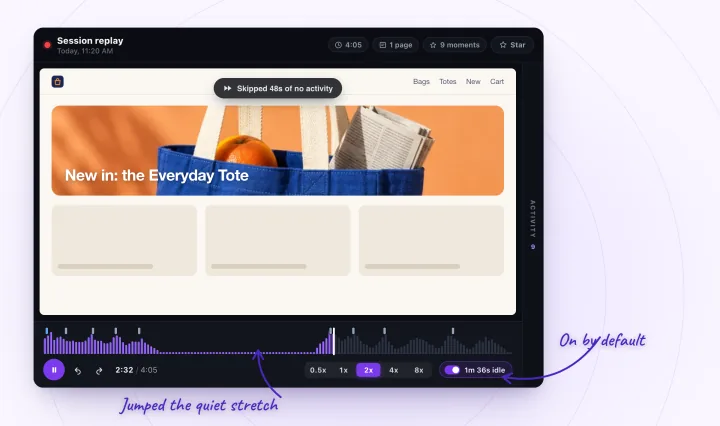
How do I stop spam form submissions on Wix?
Raise the form's spam filter. New Wix Forms filter spam on their own at one of three levels you choose in the form builder, under Settings and then Spam filter settings. Old Wix forms have an on/off spam filter and an optional reCAPTCHA field, and Wix suggests rebuilding an old form in the new version for the stronger options.
- Only reCAPTCHA. The lowest level: an invisible reCAPTCHA judges from visitors' behavior whether they're human, and shows a challenge only to suspected bots.
- Basic and reCAPTCHA. The middle level: submissions that pass reCAPTCHA go through a basic filter that labels spam using criteria such as network identifiers and contact information.
- Advanced and reCAPTCHA. The highest level adds a filter that uses more technologies, applied only to submissions the first two let through.
- Old Wix Forms. Turn on the spam filter in the form's Form Settings (from the Old Forms tab in Forms & Submissions), which hides suspected spam from your table, and in the editor add a reCAPTCHA field with + Add New Field, Anti Spam and reCAPTCHA, so visitors tick "I'm not a robot". Wix may show a reCAPTCHA on an old form without one if it sees unusual activity.
- Switching versions. An old form can't be converted to the new version: Wix's advice is to delete it and build it again with the new Wix Forms.
Whatever the level, look through the Spam tab now and then. A real message caught there isn't among your submissions, and it's deleted after 30 days.
Is there a limit on Wix form submissions?
Not by default. Wix's plans cap the number of forms and their fields, steps, conditions and email recipients, but list no cap on submissions, which don't count toward your CMS storage either. A form stops taking them at a submission limit or closing date you set, or, for a custom CMS form, at your plan's collection item limit.
- A limit you set. In the form builder, open Settings and turn on Limit Submissions to close the form after a number of submissions; old forms can also close at a date and time. When the limit is reached, Wix replaces the form with a message saying you're no longer accepting submissions.
- Forms per plan. Without upgrading, you can create 4 forms. Wix's Premium plans allow 4 on Light, 10 on Core, 25 on Business and 75 on Business Elite, and its Studio plans 4, 10, 25 or 75, from Basic to Elite.
- Fields and email recipients. Light allows up to 10 fields and 2 submission email recipients per form, Core 50 and 7, Business 75 and 20, and Business Elite 100 and 20.
- Fields that need a plan. Payment fields need a plan that accepts payments. Signature, file upload and file download fields come with Core and higher Premium plans, or Studio's Standard plan and higher.
- Custom forms on the CMS. A form built from input elements saves to your own CMS collection, which counts toward your plan's item limit: 1,000 items on a free site outside Wix Studio, 1,500 on Light, 4,000 on Core and 20,000 on Business. Once it's reached, Wix says you can't add more data. Wix Forms submissions don't count toward it.
See what happened when visitors pressed Send
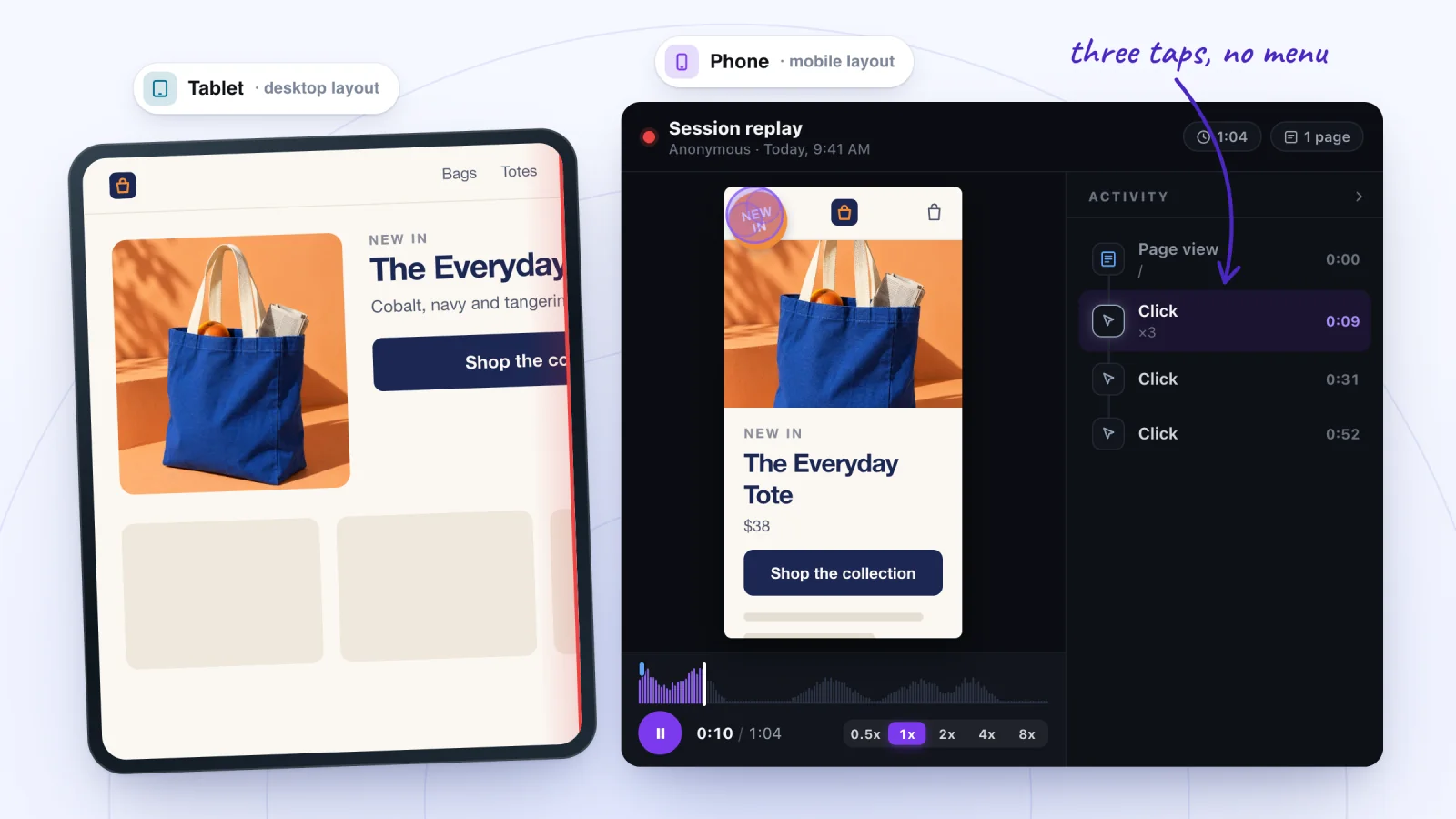
Your test shows whether the form can work. A replay of a real visit shows what happened to the visitors who tried it. Session Recordings records visits to your published Wix site from the moment it's installed, and rebuilds each one at the visitor's own window size, so a phone visit plays back in a phone's shape. On your form page, watch for:
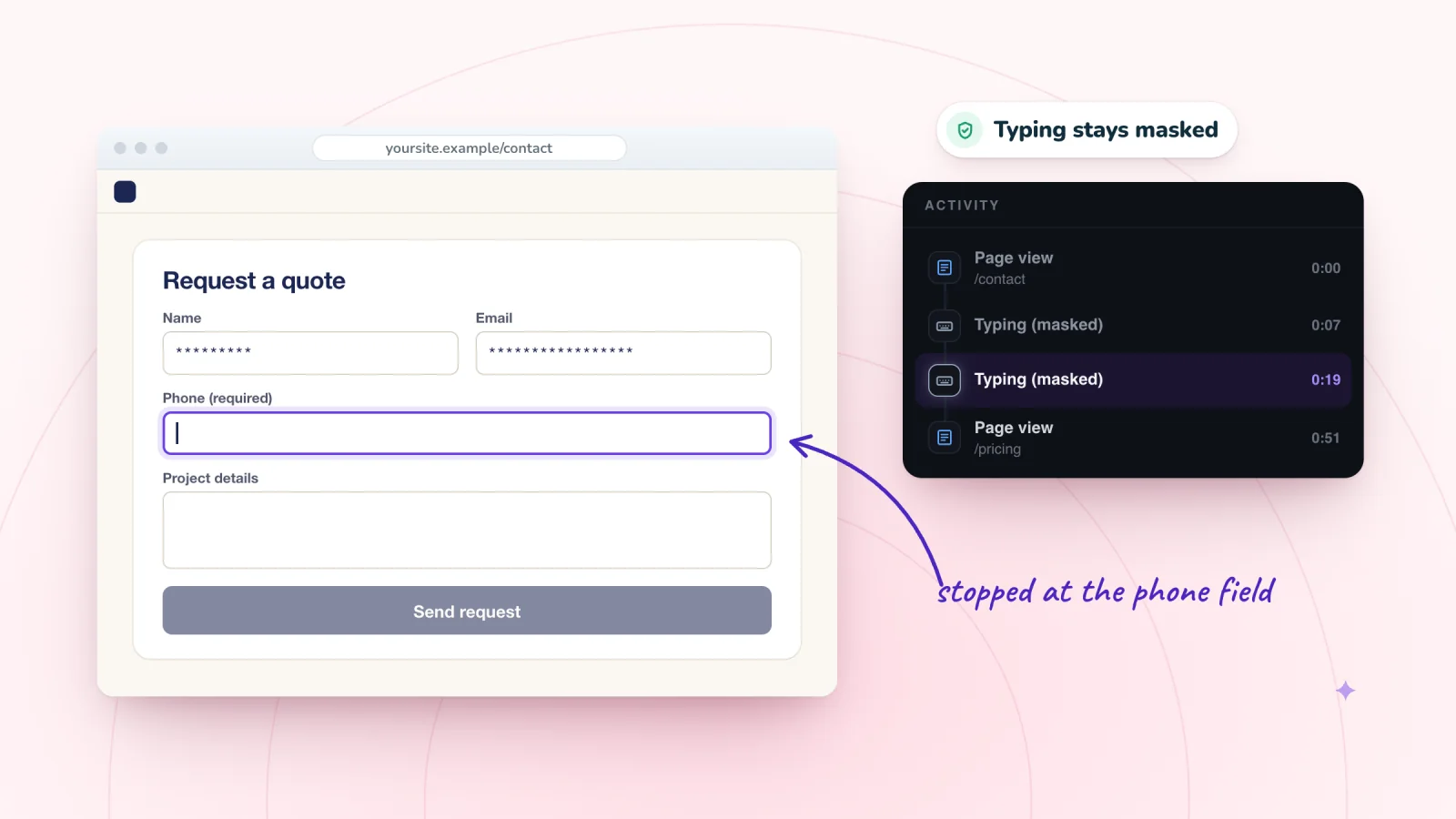
- Where they typed and stopped. Typing is masked in the visitor's browser before it's sent, so fields fill with asterisks and the Activity list shows a Typing (masked) row. You see which field someone was in and where they stopped, never what they typed.
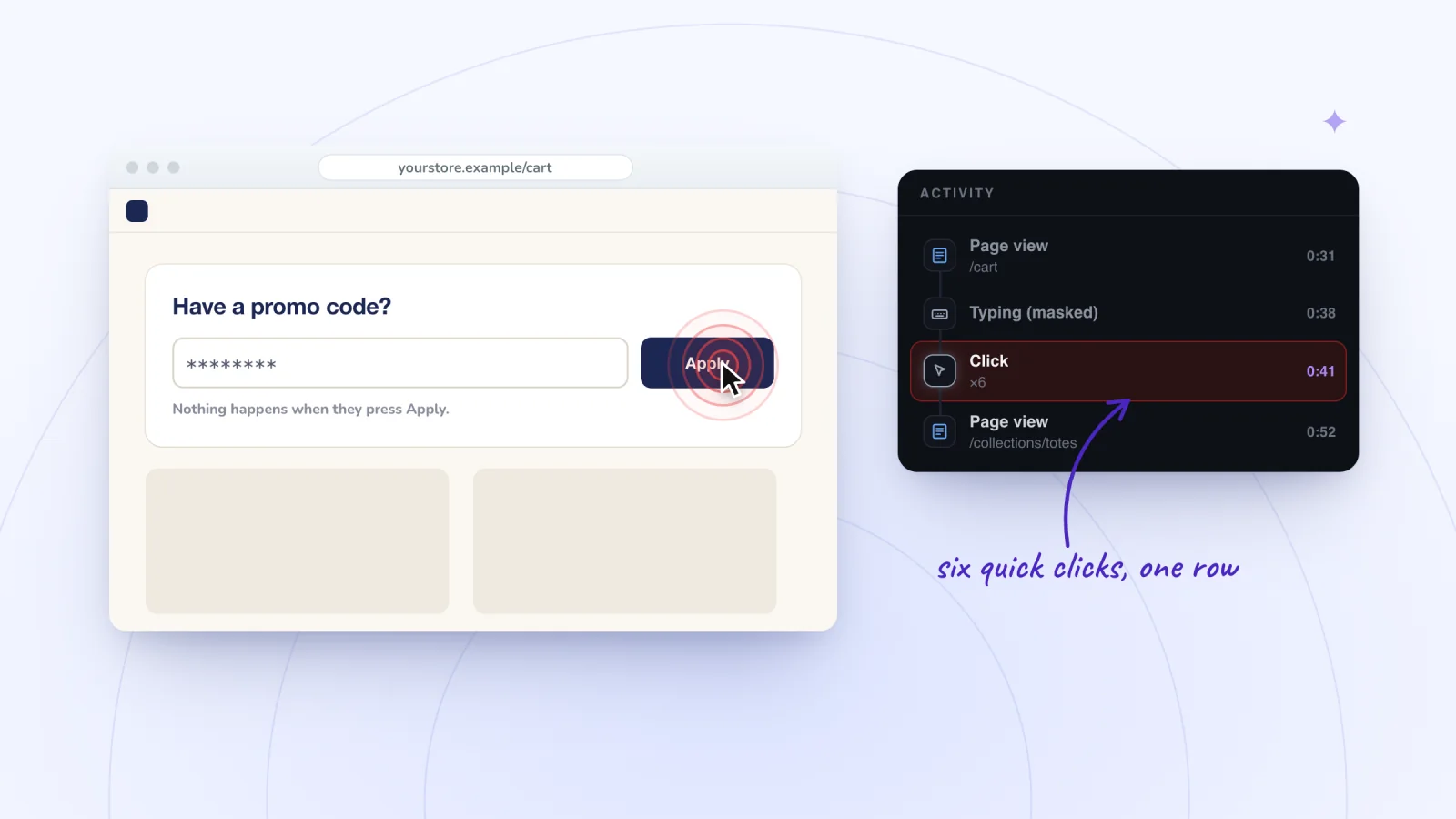
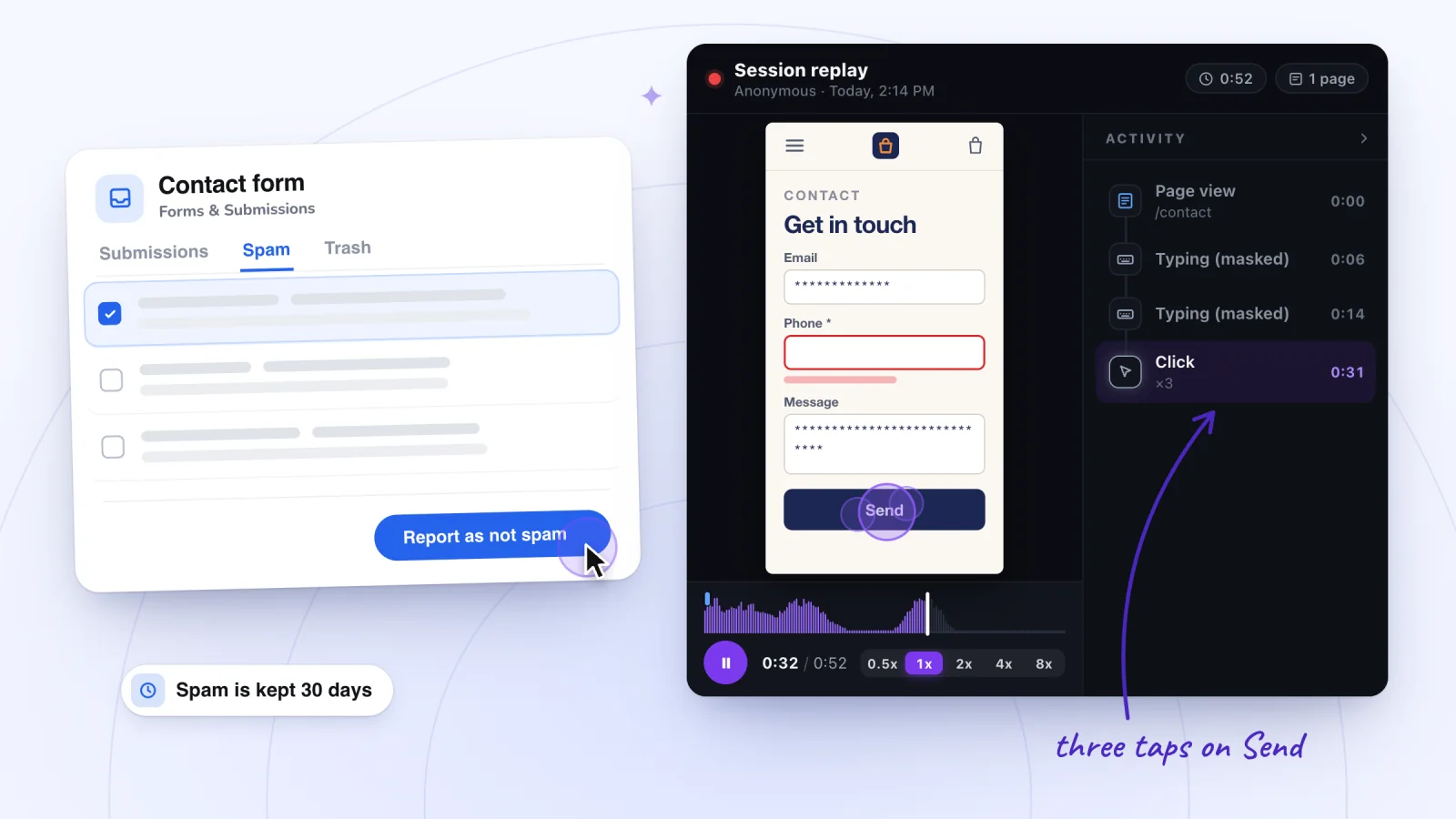
- Presses on Send. Quick clicks or taps within 1.5 seconds of each other fold into one Click row with a count, such as ×3, so a Send button pressed again and again stands out.
- What the form said. Messages a form writes on the page, such as an error under a field or your submission message, are page text, and Session Recordings masks typing, not page text. So the replay shows the message the visitor got, or that none came.
- What was in the way. A frozen footer or another element sitting over the Send button is part of the page, so the replay shows it where the visitor saw it.
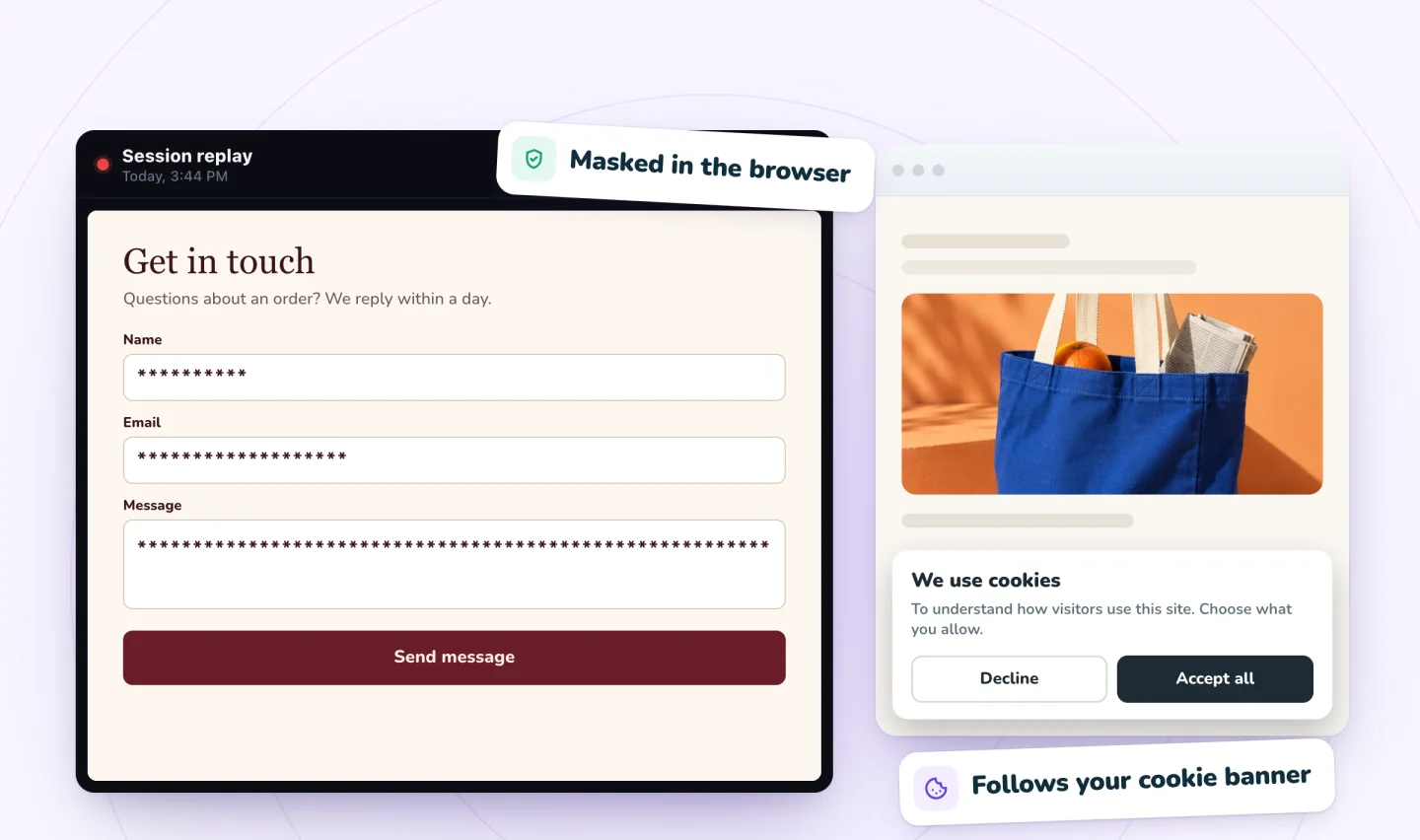
To find these visits, open the ones whose first Page view row names your form's page, or play visits at 4x or 8x until the form comes on screen, and start a few seconds before the first Typing (masked) row. If a visitor reached your submission message and nothing arrived around that time, check the Spam tab and the automation's run log.
Replays find problems; they don't count them. A visit is saved only once the visitor clicks, taps or types, and if your site has a cookie banner, visitors who don't allow analytics aren't recorded. A form you embedded from another service with Wix's HTML or URL element runs in an iFrame, Wix says, and the rrweb library Session Recordings is built on doesn't record inside frames from other sites, so that area of the replay is blank.
To see masked typing for yourself, record a visit to a sample store and play it back. If a replay shows a fault you can't fix in the editor, turn it into a bug report: Wix's form troubleshooting asks for your site's URL, your browser and operating system with their versions, and a screenshot of the browser's console. For why people start a form and stop without a fault, see form abandonment.
Frequently asked questions
Are Wix form submissions automatically sent to my email?
Yes. By default, Wix emails the site owner when someone submits a form, using an automation it sets up for the form, and keeps the submissions under Forms & Submissions in your dashboard. To send them to someone else, edit that automation's recipients. Wix asks you to add people who aren't site collaborators as contacts first.
How do I change the email address my Wix form notifications go to?
Edit the recipients in the form's automation. In Forms & Submissions, click the More Actions icon next to the form, then Form notifications, click Edit next to the automation, select its action and change Set Recipients. Wix notes that adding a recipient doesn't remove the ones already listed, and Premium plans cap them per form: 2 on Light, 7 on Core and 20 on Business and Business Elite.
Why does my Wix form work on a computer but not on a phone?
Check what covers it in the mobile layout. Wix's troubleshooting suggests looking for overlapping elements and adjusting the form's layout and placement in the mobile editor, then testing on other devices and browsers. On a custom CMS form, also make sure no required input is hidden on mobile.
Why did my test notification arrive once but not again?
Check whether the automation has Trigger once per person turned on. If it has, Wix says the address you first tested with is already counted, so the automation won't send to it again. Test with a new address each time, or switch the setting off while you test, and log out of Wix first so your test addresses aren't merged into one contact.
Can I see the message a visitor tried to send?
Only if the form saved it, in its submissions table or that table's Spam or Trash tab. A replay won't show the words: Session Recordings masks typing in the visitor's browser before anything is sent, so you see that someone typed and where they stopped, never what they wrote.
Try it on your site
Session Recordings shows what visitors did on your form pages: where they typed, with the words masked, how often they pressed Send and what the form said back. It's on from install for your published site, with 2,000 recordings a month free; see how Session Recordings keeps forms private.

Sources
All checked October 6, 2026.
- Wix Forms: Troubleshooting
- Wix Forms: The Difference between the New and Old Wix Forms
- Wix Forms: Adding and Setting Up a Form on Your Site
- Wix Forms: Viewing and Managing a Submissions Table
- Wix Forms: Managing Your Forms from the Dashboard
- Wix Forms: Choosing Who Gets Notified About Form Submissions
- Wix Forms: Protecting Your Site Forms from Spam
- Wix Forms: Adding Submission Limits to Your Forms
- Wix Forms: Upgrading Wix Forms
- Wix Forms: Adding Payments to a Site Form
- Unable to Submit Standalone Forms Containing Signature Fields (Includes Workaround)
- Unable to Click Element on Live Site
- CMS: Troubleshooting User Input Element Issues
- CMS: Understanding Collection Storage Limits and Quotas
- Wix Automations: Troubleshooting Wix Automations
- Wix Automations: Understanding Run Logs
- Wix Editor: Embedding a Site or a Widget
- Wix Status
- rrweb: recording options (recordCrossOriginIframes)

We build marketing apps for online stores: myuser.ai writes and sends emails and texts from a store's own products, and we make Session Recordings and Spin Wheel for Wix sites. Product details in our guides are checked against the apps themselves.