
Session replay demo: record your own visit
Press Start, use the sample store below for up to a minute, then press Stop to watch your visit played back: every click, tap and scroll, with your typing masked. Your recording stays in your browser: it's never uploaded or saved, and it's gone when you close the tab.
Then use this sample store for up to a minute.
Your clicks and typing will be listed here, in order.
Things to try
- Press Add to cart before you pick a size.The store asks for a size first. Two quick presses become one row in Activity: Click ×2.
- Search for something.Type in the search box and press Enter or the search button. The replay shows the box filled with asterisks, then the results.
- Type an email address.A made-up one is fine: the recording holds only asterisks, and no email is sent.
- Replay it your way.Watch at 0.5x to 8x, drag the timeline, or pick a row in Activity to jump to it.
What does this demo record?
Only the sample store in the frame, and only between Start and Stop. Every character you type is stored as an asterisk the moment it's recorded, the recording stays in this tab, and it's thrown away when you record again or close the tab.
- Recorded: the store page and each change to it, your pointer, clicks, taps and scrolling, and when you typed.
- Masked: every field, the search and email boxes included, with Session Recordings' own masking settings, so what you type never enters the recording.
- Never recorded: the rest of this page, your other tabs, and anything before Start or after Stop.
- Never uploaded or saved: the recording exists only in this tab's memory. The demo sets no cookies and needs no account, and the recorder and the player load from this site when you press Start.
- Time limit: recording stops by itself after one minute.
How does session replay masking work?
Masking swaps each character typed into a field for an asterisk inside the visitor's browser, as the visit is recorded. A replay shows that someone typed, and how many characters, but not what. The demo above masks this way, with the settings Session Recordings uses on Wix sites.
- In the browser, before anything is sent: the recorder writes the asterisks itself, so what's typed into a field never leaves the visitor's device.
- Every field: search, email and password boxes, text areas and hidden fields alike. Only whether a checkbox or radio button is ticked still shows.
- Typing, not page text: text a page displays is recorded as shown, so a page that greets a visitor by name, or repeats their search, shows those words in its replay. This sample store never writes what you type onto the page.
For cookie consent, privacy notices and how long to keep replays, read session replay privacy and GDPR.
How is Session Recordings different from this demo?
Session Recordings records real visits to your published Wix site instead of a sample page, and keeps each replay in your site's dashboard for 30 days instead of throwing it away. It records with rrweb, the same open-source recorder as this demo, and masks typing with the same settings.
- Real visits, no code: recording switches on as you add the app, for visits to your published site. The Record visits switch in its Settings turns it off.
- Saved once a visitor acts: a visit is saved only after the visitor clicks, taps or types, so someone who only looks and leaves isn't saved.
- Follows your cookie banner: visitors who don't allow analytics cookies aren't recorded. With no banner, recording doesn't wait for consent.
- Kept 30 days, free forever: 2,000 recordings a month, each kept 30 days. Starred replays have no deletion date: they stay until you erase the app's data.
- For your team only: replays open only for people with access to your site's dashboard, and visitors show as Anonymous unless they're signed in as members of your site.
See how Session Recordings keeps recordings private, everything its player shows, from live view to skipping the quiet parts, or six visit patterns to look for in real replays.
Watch real visits to your site
Typing masked in the visitor's browser, your cookie banner followed, no code to paste. Free forever: 2,000 recordings a month.
Add to site, it's free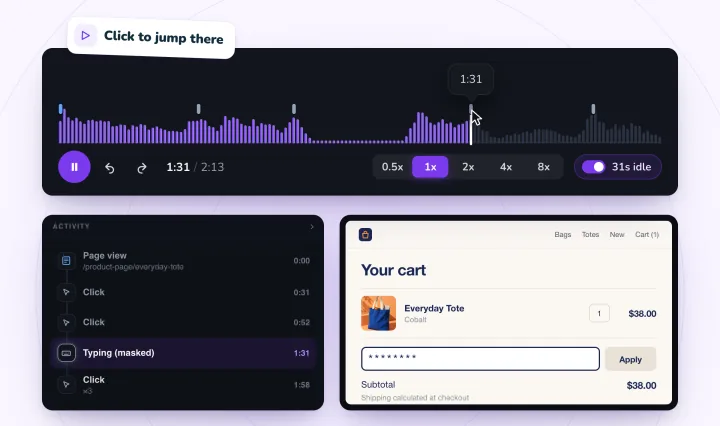
Session replay demo, answered
Is my recording uploaded or saved?
No. It stays in this tab's memory, is never uploaded or saved, and is gone when you record again or close the tab. Typing is masked as it's recorded, so even that copy holds asterisks, not what you typed. The page itself sends only what every page of this site sends to our cookieless visit counter, such as the page view and the names of the buttons you press (Start recording, Stop and so on), as our privacy policy describes. The counter can't see inside the sample store.
Is a session replay a video?
No. While you use the store, the recorder notes the page's structure and every change to it, with each pointer move, click, tap, scroll and change to a field. The player rebuilds the page from those notes and plays them back in order, so there's no video, audio or camera, and the replay is as sharp as the page itself. For the longer version, read what session recording is, in plain words.
What does the Activity list show?
The page the visit started on, then each click, with quick repeat clicks merged into one row such as Click ×3, and each time you typed, as Typing (masked). Click a row to jump to that moment. The rows follow the same rules as the Activity list in Session Recordings' player.
Can I try session replay without installing anything?
Yes, right here. The demo runs in your browser, with nothing to install and no account: press Start, use the sample store, press Stop and watch. It works with a mouse, a keyboard or a touchscreen.
How do I record real visits to my Wix site?
Add Session Recordings to your site from the Wix App Market. Recording switches on as it installs, for visits to your published site, with no code to paste. It's free forever, with 2,000 recordings a month, each kept 30 days. A visit is saved once the visitor clicks, taps or types, and if your site shows a cookie banner, only visitors who allow analytics cookies are recorded.
See your next visit through your visitor's eyes
Add Session Recordings and publish your site. Recording starts with your next visitor.