
Heatmap demo: a click map of your own clicks
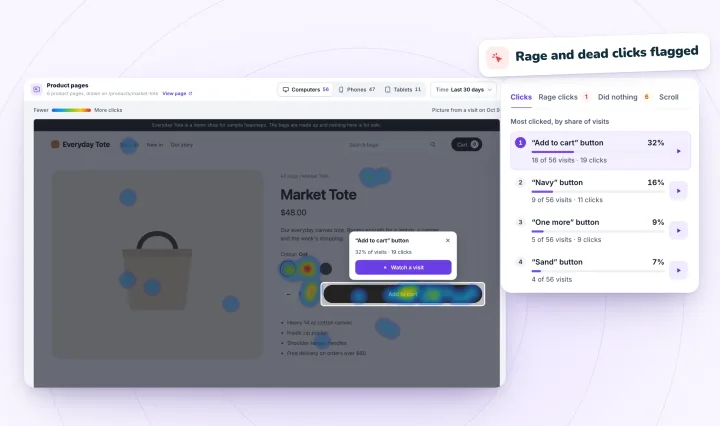
Click around the sample store below and watch a heatmap build where you click, with rage clicks and clicks that did nothing marked by the rules Session Recordings' heatmaps use. Nothing is recorded or sent: the map is drawn in this tab and gone when you leave.
Map forComputers
- Clicks
- 0
- Rage clicks
- 0
- Did nothing
- 0
- Furthest scroll
- –
Most clicked
What you click will be listed here, most clicked first.
Things to try
- Click the photo, as if to zoom in.The store doesn't answer, so after 2.5 seconds the click shows under Did nothing.
- Click Add to cart three times, fast.Three or more quick clicks in one spot are rage clicks. Pick a size first and it adds to your cart instead.
- Scroll down, then pick Scroll.The map shades the part of the page you never scrolled to.
- Press Phone width.The store narrows to 390 pixels, and phones get a map of their own.
How does the demo mark your clicks?
With the rules Session Recordings' heatmaps use, in the same four views:
- Clicks: where you clicked or tapped. The more clicks in one place, the hotter the color.
- Rage clicks: three or more clicks on one element, each within a second and 30 pixels of the last.
- Did nothing: clicks the page didn't answer within 2.5 seconds, or before your next click, though never sooner than 1.2 seconds. A scroll right after the click counts as an answer, and clicks into fields and labels never count.
- Scroll: how far down the page you went. On a real store, it's the share of visits that got at least that far.
- Devices: the map follows the store's width: up to 750 pixels is Phones, 751 to 1,000 is Tablets, and wider is Computers, unless you touch the screen, which makes it Tablets. Each keeps its own map.
How is this different from Session Recordings' heatmaps?
This demo maps one visitor, you, on a made-up page. Session Recordings' heatmaps add up the real visits to your store's or site's pages:
- Counts are visits, not clicks: five clicks from one visitor count as one visit. With only you here, the demo counts your clicks instead.
- The last 7, 30 or 90 days, with computers, tablets and phones kept apart.
- Made from the visits it records for replays, with no extra script, so the maps follow the same rules: recording follows your cookie consent, and checkout, thank-you, account and member pages never get a map.
- Free forever, with the replays: 2,000 recordings a month, each kept 30 days.
To see a replay rather than a map, record your own visit to the same sample store and watch it back.
Heatmaps of your own store's pages
Session Recordings turns the visits it records into click and scroll heatmaps, page by page, with rage clicks and clicks that did nothing marked. Free forever: 2,000 recordings a month.
Heatmaps, answered
What is a click heatmap?
A picture of a page with color where visitors clicked or tapped: the hotter the color, the more clicks. It shows which buttons, photos and links people try, and which ones they miss.
What is a rage click?
Three or more fast clicks in one spot, usually on something that didn't respond the way the visitor expected. Session Recordings counts clicks on one element as rage clicks when each lands within a second and 30 pixels of the last.
What counts as a click that did nothing?
A click the page didn't answer: nothing on it changed within 2.5 seconds, or before the visitor's next click, and it didn't scroll right away. Clicks into fields and labels never count, since a click there just puts the cursor in.
Does this demo record me?
No. It watches your clicks in the sample store only to draw the map, keeps them in this tab's memory and sends them nowhere, so they're gone when you close the tab. Like every page on this site, a small cookieless visit counter counts the page view and the first press of each button.
Why does each device get its own map?
A page lays out differently on a phone than on a computer, so the same spot on the screen holds something else. Mixing them would put a phone's taps on a computer's layout. Session Recordings keeps computers, tablets and phones apart, as this demo does.
See your next visit through your visitor's eyes
Install it on Shopify and switch it on in your theme, or add it to your Wix site. Recording starts with your next visitor.